Computer Launcher for Android: Turn Your Phone Into a Desktop-Style Workspace

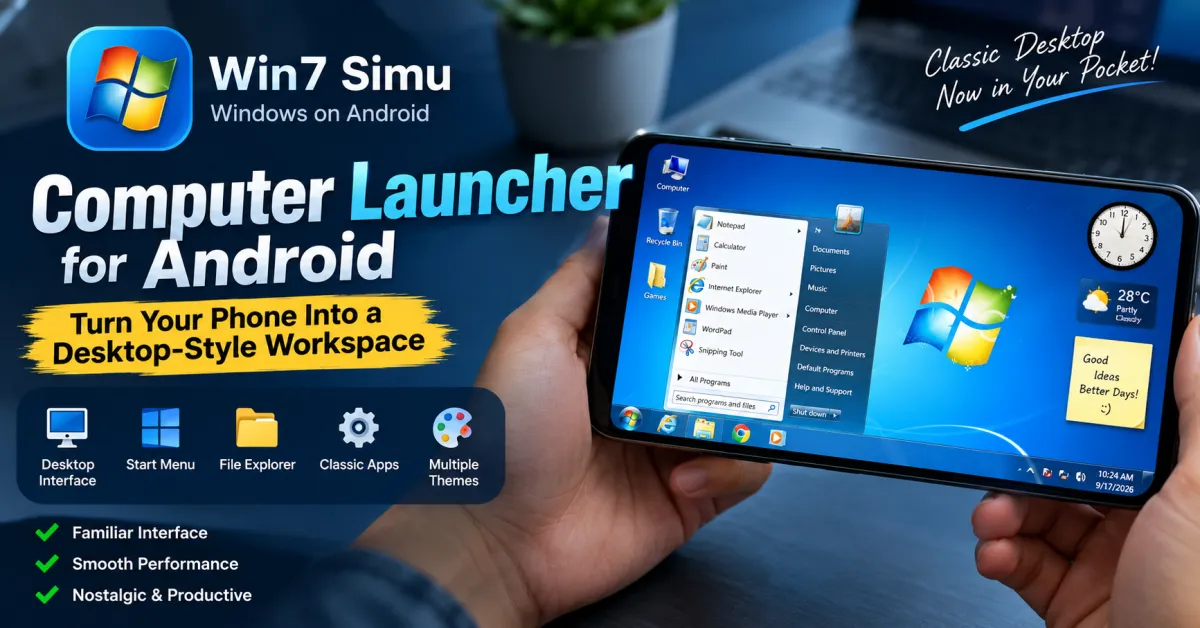
Ever wished your Android phone could feel more like a traditional Windows computer? A normal Android home screen is built around app icons, widgets, and gestures, but that experience can feel very different from the familiar desktop environment many people grew up using. Win7 Simu offers an interesting solution by recreating the look and feel of a classic Windows desktop directly on Android. Instead of simply changing icons or wallpapers, it gives you a complete simulated desktop with a taskbar, Start menu, windows, familiar utilities, and nostalgic visual details.
What Is Win7 Simu?
Win7 Simu is an interactive Windows-inspired simulator developed by Visnalize. It recreates the classic desktop experience on Android with a boot animation, login screen, desktop, taskbar, Start menu, simulated programs, and customizable themes. The current Google Play listing describes it as a Windows simulator with more than 30 themes and full-touch support.
If you want to explore the experience yourself, you can try the Windows-style Android desktop simulator from Google Play.
One important distinction is worth mentioning: Win7 Simu is a simulator, not a replacement Android launcher or a way to install Windows software on your phone. The developer specifically says it is not designed to function as the device’s home-screen launcher.
A Familiar Desktop Experience on Your Phone
Windows-Style Desktop
The biggest attraction is the desktop itself. Instead of interacting with a conventional Android home screen, you enter a simulated environment designed around the familiar Windows desktop concept.
You can interact with a taskbar, Start menu, desktop shortcuts, windows, menus, and other interface elements. The goal is not simply to make Android look like Windows; it is to recreate the experience of using a classic desktop operating system.
For anyone who remembers Windows 7’s Aero-style interface, glass effects, Start menu, and desktop gadgets, the experience can be surprisingly nostalgic.
Taskbar and Start Menu
The taskbar is one of the most recognizable parts of the interface. It provides a familiar place for accessing applications and navigating the simulated desktop.
The Start menu also recreates the classic Windows-style application navigation experience. This makes the simulator particularly enjoyable for users who want to explore an old-school computer interface on a modern smartphone.
The developer continues to improve these components. The September 2026 update, for example, introduced additional improvements to the taskbar and Start menu along with updates to File Explorer.
Simulated Computer Programs
Classic Apps With Functional Features
Win7 Simu goes beyond a static desktop theme. It includes simulated versions of familiar programs such as Calculator, Notepad, WordPad, Internet Explorer, Media Player, and Snipping Tool. These applications provide interactive functionality within the simulated environment.
This makes the app more engaging than a simple Windows-themed wallpaper or icon pack. You can open applications, move around the interface, experiment with menus, and explore different parts of the simulated operating system.
File Explorer and Desktop Tools
File Explorer adds another layer to the desktop experience. Recent updates have expanded Android-drive support and improved file handling inside the simulator. The developer’s changelog also notes recent improvements to full read-write support for the Android drive.
There are also utilities such as Calculator and Control Panel-style settings. The Calculator has received advanced features including scientific and programmer-oriented modes, while Control Panel includes tools such as backup and restore.
These features make the environment feel more like a miniature computer workspace rather than a simple visual demo.
Themes and Customization
More Than Just Windows 7
Although Windows 7 is the central inspiration, Win7 Simu does not stop there. The simulator includes themes inspired by other operating systems, including Windows 2000, Windows Vista, Windows 10, Windows 11, macOS, Ubuntu, and additional designs.
This variety is useful if you enjoy experimenting with different desktop aesthetics. You can switch between styles rather than being locked into a single Windows 7 appearance.
Create Your Own Theme
For users who enjoy customization, the built-in Theme Studio provides another interesting option. It allows you to create personalized themes and transform the simulator into your own desktop design.
That makes Win7 Simu appealing not only to Windows enthusiasts but also to people who enjoy customizing interfaces and experimenting with retro software design.
Can You Use It Like a Real Windows PC?
No. Win7 Simu is a simulator, not a Windows emulator or full Windows installation. You cannot install normal Windows .exe programs and expect them to run inside the app. The developer explicitly confirms that the simulator does not provide the infrastructure required to run Windows programs.
Some simulated browser functionality is also limited. The experience is primarily intended to recreate the interface, applications, and nostalgia of classic Windows rather than turn an Android phone into a fully functional Windows computer.
This distinction is important because it sets realistic expectations before installing the app.
How to Get the Most From a Desktop-Style Android Experience
Start by exploring the default Windows 7 environment rather than immediately changing everything. Learn how the Start menu, taskbar, desktop shortcuts, File Explorer, and simulated applications work.
Next, experiment with different themes. If you prefer a modern look, try one of the newer operating-system-inspired designs. If nostalgia is your priority, stay with the classic Windows 7 Aero experience.
You can also use the simulator for entertainment, demonstrations, screenshots, or simply showing friends what a familiar desktop interface looks like on a smartphone.
For comparison, Android itself already supports extensive home-screen customization through apps, shortcuts, folders, and widgets. Google’s official Android guidance explains how these elements can be arranged and resized on supported devices. (Google’s Android home-screen guide)
Who Should Try Win7 Simu?
Win7 Simu is particularly suitable for:
- Windows 7 fans who miss the classic interface
- Users interested in retro and nostalgic software
- People who enjoy exploring simulated operating systems
- Android users looking for an unusual desktop-style experience
- Content creators who need a distinctive interface for demonstrations
- Anyone curious about how a traditional computer desktop can be recreated on a phone
It may not be suitable if your goal is to replace your Android launcher or run actual Windows applications. For those purposes, a simulator cannot provide the same functionality as a genuine desktop operating system.
Frequently Asked Questions
Is Win7 Simu a computer launcher for Android?
No. Win7 Simu provides a desktop-style simulated environment, but the developer states that it is not designed to replace the Android home-screen launcher.
Can Win7 Simu run Windows programs?
No. You cannot install and run normal Windows .exe programs because Win7 Simu is a simulator rather than a full Windows environment.
Does Win7 Simu work offline?
Yes, the simulator can work offline, although some features such as user accounts, certain games, and browser functions require an internet connection.
Can I customize the Windows-style interface?
Yes. Win7 Simu offers multiple themes and includes a Theme Studio for creating custom designs.
Does it support touch controls?
Yes. The Android version is designed with full-touch support, allowing users to interact with the simulated desktop directly from the phone’s touchscreen.
Is Win7 Simu still being updated?
Yes. The developer continues to release updates. Version 4.6.0, released in September 2026, included improvements to the taskbar, Start menu, File Explorer, games, and Android-drive functionality.
Conclusion
A smartphone may be far more powerful than the computers many of us used years ago, but its interface is usually very different from a traditional desktop. Win7 Simu bridges that gap through nostalgia and simulation, recreating the familiar Windows-style desktop, taskbar, Start menu, applications, themes, and other interactive elements on Android.
It is not a replacement for Windows and cannot run standard Windows software, but that is not really its purpose. Its strength is creating a surprisingly detailed desktop experience that you can explore directly from your phone.
If you enjoy classic Windows interfaces or simply want something different from the standard Android experience, explore Win7 Simu on Google Play and see how closely your phone can resemble a classic desktop.
Also Read: Orbit Launcher: Powerful AI Features & 3D HUD Themes