
Orbit Launcher: Powerful AI Features & Stunning 3D HUD Themes

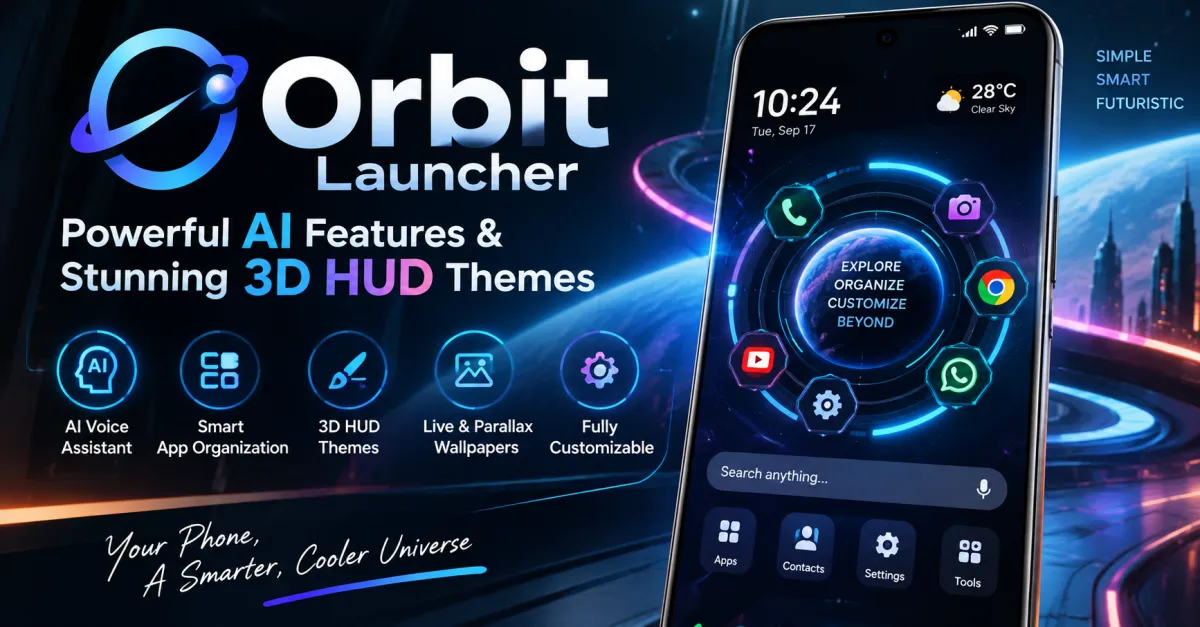
Your Android home screen is the first thing you see every time you unlock your phone, yet the default launcher can quickly feel repetitive, cluttered, and uninspiring. If you want a smarter interface that also looks genuinely futuristic, Orbit Launcher offers a different approach. It combines AI-powered features, 3D HUD visuals, smart app organization, parallax wallpapers, widgets, and deep customization in one Android launcher. The result is a home screen that feels less like a basic app grid and more like a futuristic command center.
What Is Orbit Launcher?
Orbit Launcher is a futuristic Android launcher designed for users who want more control over both functionality and appearance. Instead of simply replacing the standard home screen, it creates a sci-fi-inspired interface with circular app navigation, animated effects, HUD-style information, and customization options.
The launcher currently has more than 50,000 downloads on Google Play and a 4.6-star rating from more than 2,000 reviews. Its feature set focuses on two areas: making everyday phone navigation smarter and giving Android a distinctive visual identity.
If you want to try the experience, you can download Orbit Launcher from Google Play.
AI Features That Make Android More Convenient
Gemini-Powered AI Voice Assistant
One of Orbit Launcher’s standout features is its AI voice assistant, powered by Gemini. Instead of manually searching through menus, users can interact with the assistant using natural voice commands.
You can use voice interaction to launch apps, search the web, read information, and perform certain tasks without navigating through multiple screens. This makes the launcher particularly useful when your hands are busy or when you simply want faster access to common actions.
Google describes Gemini as an AI assistant that can help users learn, plan, write, and handle everyday tasks through natural interaction.
Smart App Organization
Finding an app becomes frustrating when your phone contains dozens or hundreds of icons. Orbit addresses this with a smart app library that can organize applications into categories such as social, shopping, gaming, and productivity.
This approach reduces the need to maintain folders manually. Instead of remembering exactly where an app is located, you can use Orbit’s organization and search features to reach it more quickly.
Global Search
Orbit also includes global search for quickly finding apps, contacts, and web results. For users who frequently switch between different applications, a fast search option can be more practical than scrolling through multiple home-screen pages.
Stunning 3D HUD Themes and Visual Effects
Sci-Fi and Cyberpunk Home Screens
The visual design is where Orbit Launcher really stands apart from conventional Android launchers. Its 3D HUD interface takes inspiration from futuristic computers, cyberpunk interfaces, and science-fiction control panels.
You can select futuristic wallpapers and HUD backgrounds to give your phone a completely different appearance. The interface is designed to feel immersive rather than simply placing a static wallpaper behind standard icons.
Gyroscope Parallax Wallpapers
Orbit supports gyroscope-based parallax wallpapers that respond to your phone’s movement. When you tilt the device, visual elements can shift to create a sense of depth.
This effect is especially useful if you enjoy 3D wallpapers but do not want to constantly interact with the screen. The movement of the phone itself helps create a more dynamic home-screen experience.
Animated Glow and HUD Effects
The launcher also includes pulsating glow effects and cinematic transitions. These details may seem cosmetic, but they help create a consistent futuristic theme across the interface.
For users who enjoy cyberpunk, sci-fi, gaming, or technology-inspired designs, these visual effects can make a standard Android device feel much more personalized.
Practical Features Beyond the Design
Orbit is not only about appearance. It includes several utilities intended to make the launcher useful for everyday Android use.
The system HUD overlay can display information such as battery, RAM, and storage directly on the home screen. There is also an app-lock feature for protecting selected applications, along with options to hide apps from the launcher grid.
The built-in widget suite brings useful tools such as weather, music controls, news, and a flashlight closer to the home screen. This can reduce the need to install separate widgets for basic tasks.
Orbit also supports third-party widgets and notification badges, allowing users to retain familiar Android functionality while changing the overall interface.
How to Get the Best Orbit Launcher Experience
The key is not to enable every effect simply because it is available. A futuristic launcher can become distracting if the home screen contains too many animations, widgets, and visual elements.
Start with one HUD theme and a clean wallpaper. Add only the widgets you regularly use, such as weather or music controls. Then configure the app library and global search so your most-used applications remain easy to access.
For a more immersive setup, combine a sci-fi wallpaper with parallax movement, matching icon packs, and subtle glow effects. This creates a cohesive look without making the interface unnecessarily busy.
If privacy matters to you, review the launcher’s permissions and Google Play’s data-safety information before enabling optional services. Orbit states that its Accessibility Service is used for features such as gestures and screenshots, while its Google Play listing also provides the developer’s current data-safety disclosures.
Who Should Use Orbit Launcher?
Orbit Launcher is best suited to Android users who want something beyond the standard home-screen experience.
It is particularly appealing if you:
- Enjoy futuristic, sci-fi, or cyberpunk interfaces
- Want AI-assisted voice interaction
- Prefer smart app organization
- Like 3D and parallax wallpapers
- Want detailed home-screen customization
- Need quick access to system information
- Enjoy experimenting with different Android launcher designs
It may not be the ideal choice if you prefer an extremely minimal launcher with almost no animations or visual customization. Orbit’s main strength is its immersive interface.
Frequently Asked Questions
Is Orbit Launcher free?
Yes. The main Orbit Launcher listing on Google Play is available with ads and in-app purchases. Some advanced features may vary depending on the version or premium options available.
Does Orbit Launcher support AI?
Yes. Orbit includes a Gemini-powered AI voice assistant designed for hands-free interaction, including launching apps, searching the web, and handling supported commands.
Does Orbit Launcher have 3D wallpapers?
Yes. Orbit supports gyroscope-based parallax wallpapers that create a depth effect as you move your phone. It also offers futuristic and cyberpunk-style wallpapers.
Can I customize Orbit Launcher?
Yes. Orbit supports themes, wallpapers, icon packs, widgets, glow effects, animations, and other home-screen customization options.
Does Orbit Launcher organize apps automatically?
Yes. Its smart app library can organize applications into categories such as social, games, and shopping, making large app collections easier to manage.
Is Orbit Launcher suitable for everyday use?
Yes. Beyond its futuristic appearance, Orbit includes search, widgets, app locking, system information, notifications, and other practical launcher features. The best experience comes from balancing visual effects with a clean, useful layout.
Conclusion
Orbit Launcher brings together two things that do not always come together in Android launchers: useful AI features and an impressive futuristic design. Its Gemini-powered voice assistant, smart app organization, global search, 3D HUD themes, parallax wallpapers, widgets, and customization tools make it more than a simple cosmetic launcher.
If your Android home screen feels outdated or you simply want your phone to look and behave differently, Orbit is worth exploring. Try Orbit Launcher on Google Play and build a home screen that matches your style.
Also Read: Depth Wallpapers & Live Clock: Free App



One Comment