
Depth Wallpapers & Live Clock Free App: Give Your Android Screen a Fresh Look

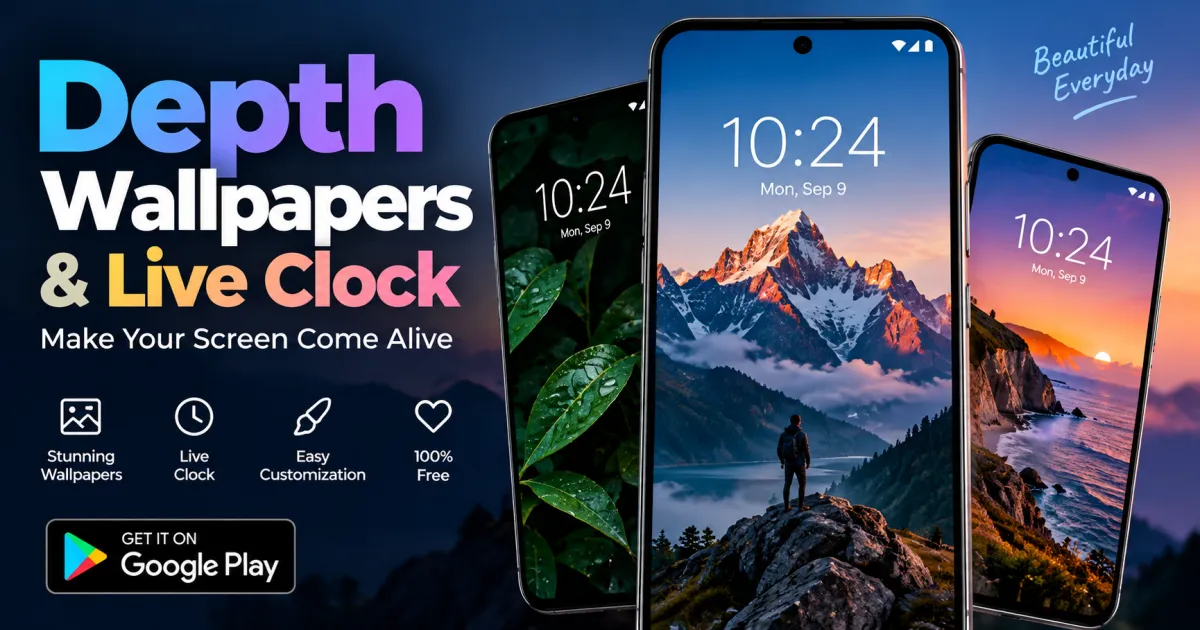
Your phone’s wallpaper does more than decorate the home screen—it can change the entire feel of your device. But finding a wallpaper that looks modern, adds depth, and remains useful without paying for premium features can be difficult. That is where a Depth Wallpapers & Live Clock free app can make a difference.
Instead of using a basic static background, you can combine stylish depth wallpapers with a live clock to create a more dynamic lock screen experience. The right wallpaper app can help you personalize your Android device without complicated editing or expensive subscriptions.
What Is a Depth Wallpaper?
A depth wallpaper is designed to create a layered visual effect. Rather than making the background look completely flat, the image uses foreground and background elements to give the impression of depth.
This effect can make your phone’s lock screen look more sophisticated, particularly when the wallpaper works well with the clock and other interface elements.
Depth wallpapers can include:
- Nature and landscape scenes
- Abstract designs
- City and architectural photography
- Dark and AMOLED-friendly backgrounds
- Minimalist designs
- Artistic and colorful compositions
The key advantage is that a good depth wallpaper can make an ordinary Android lock screen feel more personalized without requiring advanced customization skills.
Why Combine Wallpapers With a Live Clock?
A wallpaper and clock do not have to be separate parts of your lock screen. When they complement each other, the result can look much more polished.
A live clock wallpaper adds a time display that fits naturally into the overall design. Depending on the app and device, users may be able to choose different clock styles, positions, or visual effects.
This is particularly useful if you prefer your phone to have a distinctive appearance rather than relying on the default Android lock screen.
A live clock can also make a wallpaper feel less static. Subtle movement combined with a constantly updating clock can create an attractive effect every time you unlock your phone.
Features to Look for in a Free Wallpaper App
Not every wallpaper application offers the same experience. If you are searching for a free depth wallpaper solution, consider the features that actually improve everyday use.
High-Quality Wallpapers
Resolution matters. A wallpaper that looks sharp on a small preview can appear blurry when stretched across a modern smartphone display.
Look for wallpapers that are designed for smartphone screens and maintain good detail when applied.
Depth and Layered Effects
The main attraction of depth wallpapers is the sense of separation between different elements of the image. A strong depth effect should look natural rather than overly artificial.
Wallpapers with clear foreground subjects often work particularly well because they can create a stronger layered appearance.
Live Clock Customization
A useful live clock feature should complement the wallpaper rather than cover important visual elements.
Different clock layouts, fonts, sizes, and placements can help users create a setup that matches their personal style.
Easy Setup
Customization should not require a complicated process. Ideally, users should be able to preview a wallpaper, select their preferred clock style, and apply the result with just a few taps.
If you want to explore the available Android option, you can check out the Depth Wallpapers & Live Clock app on Google Play and see whether its features match your preferences.
How to Create a Better Lock Screen Setup
Choosing a good wallpaper is only part of the process. The combination of image, clock, and icons can determine whether the final result looks clean or cluttered.
Start with an image that has enough empty space for the clock. If the main subject is directly behind the time display, important parts of the wallpaper may become difficult to see.
Dark wallpapers are another practical choice, especially if you prefer a minimalist appearance or use an AMOLED smartphone. Bright images can look impressive too, but excessive detail may make the lock screen harder to read.
It is also worth experimenting with different clock positions. A clock placed slightly away from the main subject can preserve the visual focus of the wallpaper while keeping the time easy to read.
Is a Live Wallpaper Good for Your Phone?
Live wallpapers can look impressive, but they may use more resources than a completely static image. The actual impact depends on factors such as animation complexity, display technology, device hardware, and how the application is implemented.
If battery life is a priority, choose subtle animations instead of highly active backgrounds. You can also check Android’s official battery-saving guidance for additional ways to manage battery usage.
For most users, the best approach is to find a balance between appearance and everyday performance.
Who Should Use a Depth Wallpaper and Live Clock App?
This type of wallpaper app can be useful for anyone who wants more personalization without manually designing a lock screen.
It is especially suitable for:
- Android users who are tired of default wallpapers
- People who enjoy minimalist phone customization
- Users who want a modern lock screen
- Anyone interested in live or animated wallpapers
- Users looking for free wallpaper customization options
You do not need to be a designer to create an attractive setup. Starting with a high-quality wallpaper and a simple clock style is often enough.
Frequently Asked Questions
Are depth wallpapers free to use?
Many wallpaper apps provide free wallpapers and customization features, although the exact selection and available options depend on the individual app.
What is a live clock wallpaper?
A live clock wallpaper combines a phone background with a clock display or clock-related visual element. Some apps may also include animation or other customization features.
Do live wallpapers drain battery?
They can consume more battery than static wallpapers, particularly when they use continuous animation. Choosing lightweight effects can help reduce the impact.
Can I use depth wallpapers on Android?
Yes. Android supports wallpaper customization, although the available depth and live wallpaper features can vary by device and Android version.
Will a depth wallpaper slow down my phone?
A simple wallpaper generally has little noticeable impact on modern smartphones. More complex animated effects may use additional CPU, GPU, or battery resources depending on the device.
How can I make my lock screen look better?
Choose a high-resolution wallpaper, keep the clock readable, avoid placing important subjects behind text, and use a design that matches your phone’s overall theme.
Conclusion
A well-designed wallpaper can completely change the appearance of an Android phone. Depth wallpapers add a layered visual effect, while a live clock can make the lock screen feel more dynamic and personalized.
The best setup does not necessarily need complicated customization or expensive software. A high-quality background, a clean clock style, and subtle visual effects can be enough to create a polished result.
If you want to refresh your Android lock screen, take a look at the Depth Wallpapers & Live Clock free app and explore the available customization options. A small change to your wallpaper can make your everyday phone experience feel noticeably more personal.

One Comment